Table of Contents
Encoder Configurator
This page describes the Encoder Configurator software. It is used for calibration, monitoring, and checking of the Reverso encoder from a Windows PC.
The Encoder Configurator is a software running on Windows for calibration, monitoring, and checking of the Reverso encoder.
The communication between the PC and the encoder is based on an RS485 communication interface, using a programming cable from NILAB.
Download here: https://www.nilab.at/download/revenc368-firmware-09092020-flash-tool/?wpdmdl=3804&refresh=670f811cac1011729069340
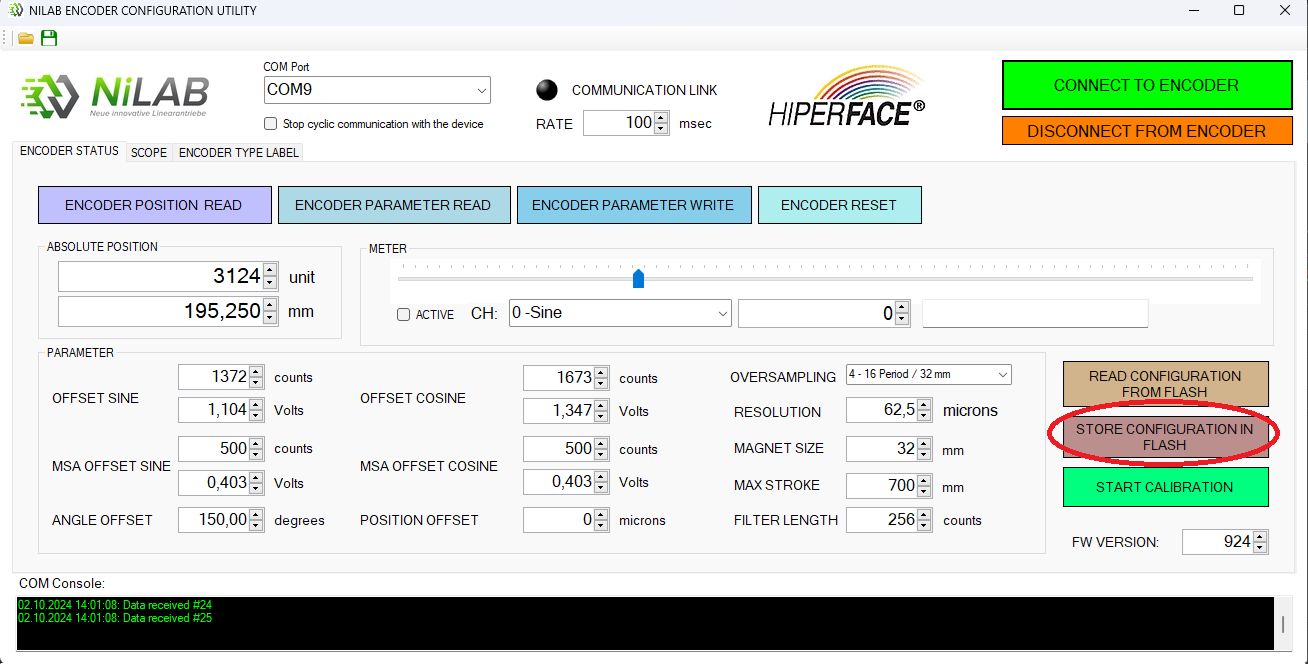
What the Encoder Configurator is used for
- Calibration: set the SIN/COS period and the absolute position parameters. - Monitoring: check the encoder signals and the operating status. - Checking: verify the encoder configuration and the communication.
How to proceed
- Connect the encoder to the PC with the NILAB programming cable (RS485). - Start the Encoder Configurator and select the connected encoder. - Set the desired SIN/COS period and the resolution, and store the configuration. - Verify the communication and the encoder output after the configuration.