Table of Contents
Pacdrive3 - Lxm62 servo drive
1. PLC Configuration
The axis must be set as Lexium62 linear drive inside the Machine Expert and the motor indentification must be set as motor without type plate.

2. Setting the typeplate
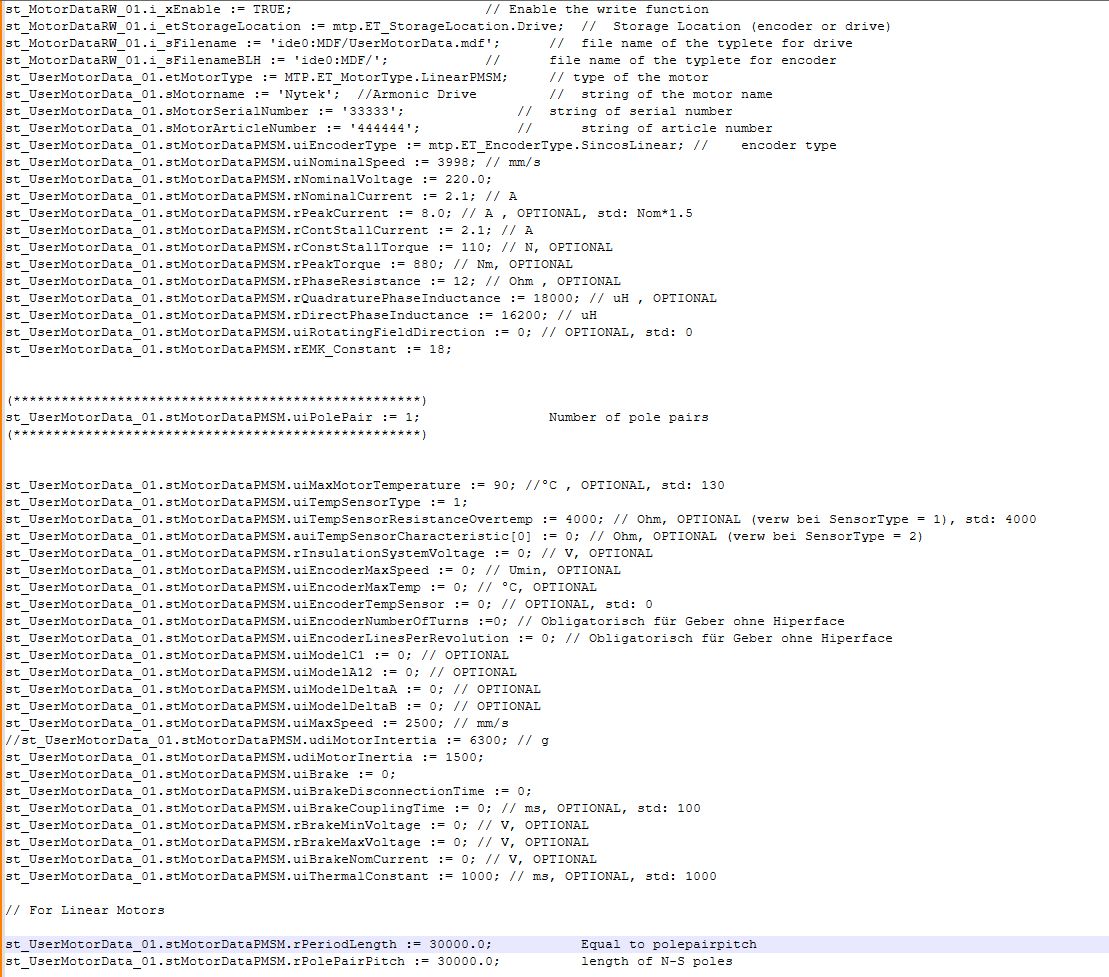
3. Write type plate file inside the flash card
To create the typeplate file inside the flash you must use this function:

It create a file inside the flash with the data of the structure
4. Delete actual data inside the drive
Before all you must set the sercos phase to 2
Then you must delete any data inside the drive with this function block.

If there is no data inside the result show this situation. If all the process goes right the msg is “Done”
5. Write typeplate inside the drive
Sercos still in phase 2
To write the data you must use the function block.

6. Turn off the drive
Set Sercos Phase to phase 0 and then to phase 4. Or you turn OFF - ON the drive
If everything is ok you get green light on the drive.
7. Motor commutation
Turn ON the power to the Power supply
Set TRUE on PowerSupplyCheckSet of the PSD. Set to 2 / test the MotorCommutationControl.
The motor should move and the commutation procedure start
At the end the MotorCommutationState gives to you the right feedback.
Turn to 0 the MotorCommutationControl and turn OFF the PowerSupplyCheckSet.