PLC Control of 2 motors with synchronization
In order to control 2 motors in parallel and synhronized way, following the schema below (this example is using NiLAB NL-DB15-MG6 terminal blocks provided by NiLAB)

In the case of use of 2 x NLi080Q/X linear motor please connected the Pin 4 and Pin 5 to 24VDC and Pin 6 and Pin 7 to GND on each motor terminal blocks.
For a complete PIN description see here:https://www.nilab.at/dokuwiki/doku.php?id=integrated_drive_motors:connection_system|
2 outputs line must be provided from the PLC: Enable and Trigger. These are 24VDC level signals used to Enable (Pin 8 of each motor, first enable from power cycle automatically starts the homing procedure) and Trigger (Pin 9 of the two motors). In order to communicate using MODBUS RTU bus the Pin 1 and Pin 2 must be connected in parallel to the PLC modbus port.
Please make sure that the two motors on the MODBUS have 2 different MODBUS Address (ID Node) before connecting the MODBUS lines together.
The parameter to chage is: Parameter 1 Device ID in the Parameter window inside NiLAB Starter software.
| MOTOR 1 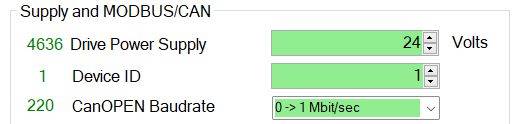 | MOTOR 2 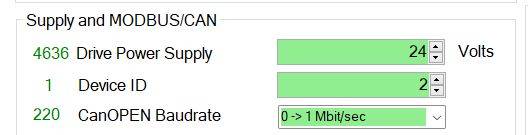 |
Then, select on each motors the option I/O control - Parameter 4097 in Motion controller window of NiLAB Starter software.

Finally, set the Trigger mode in each motors to synchronize the two motors motion, for example at every rising edge of Digital Input 1.
