

Action unknown: siteexport_addpage
meta data for this page
Starter Status Area
The left area of the NiLAB Starter is the motor status area window.
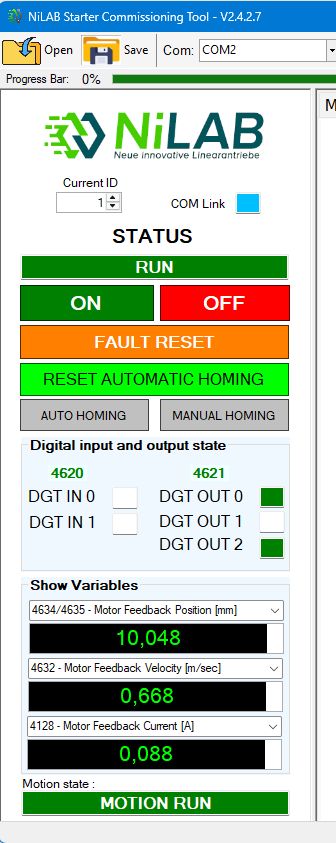 | On the top of the list we have: * Current ID ⇒ Modbus address. This can be changed in order to connect to different modbus nodes * COM LInk LED shows the status and the speed of the serial communicaiton. The STATUS text shows the current status of the motor. For example READY (Motor is switched-off and ready to be switched-on), RUN (motor switched on). In the area below we have all the motor controls: - ON - Motor power on - OFF - Motor power off - FAULT RESET - Reset the active fault - RESET AUTOMATIC HOMING - Reset the homing flag to perform a new automatic homing - AUTO HOMING - Automatic homing start - MANUAL HOMING - Set the 0 axis on the current position of the motor slide Digital input and output state section show the current status of the digital inputs and outputs. Show variables are 3 configurable numeric variables with this options: * 4096 - Axis Command Word * 4608 - Axis Status Word * 4634/4635 - Motor Feedback Position [mm] * 4632 - Motor Feedback Velocity [m/sec] * 4128 - Motor Feedback Current [A] * 4130 - Motor Encoder Sin [Lsb] * 4131 - Motor Encoder Cosin [Lsb] * 4132 - Motor Encoder Arctan [Lsb] * 4631 - Power Dcbus Voltage [V] * 4630 - Power i2t Value * 4129 - Power i2t 1sec * 7 - Motor Drive Temperature [°C] * 8/9 - Motor Number of Cycles Reached * 10/11- Motor Trip Distance Traveled [m] * 5/6 - Motor Drive on Time [sec] * 4133/4134 - Control Position Target [mm] * 4135 - Control Speed Target [m/sec] * 4136 - Control Current Target [A] The MOTION STATE shows the motion machine state value. For example MOTION RUN when the motor is moving, WAITING FOR TRIGGER if the motion controller is waiting for the trigger. |