meta data for this page
MODBUS RTU debug mode
This mode tests the correct connection of the MODBUS RTU fieldbus lines without a PLC or NILAB Starter software. The motor automatically sends a string after the motor controller boots.
To enable this function, parameter 4097 must be set to zero, which corresponds to no I/O control (this is the default value when the motor is shipped from production), and the two digital inputs must be connected to 24VDC before powering the motor. The firmware version must be ≥ 5E39.
The motor sends the following information, corresponding to 4 bytes, and the state of the motor is set to SAFE STOP.
1. Slave ID (1 byte) 2. Firmware version (2 bytes) 3. Motor type (1 byte)
Example using Realterm
Realterm is open-source software and can be downloaded here: RealTerm: Serial/TCP Terminal download | SourceForge.net
In Display, select Hex(Space); in Port, select the right COM (in this example COM2) with 38400 baud, parity Even, data bits 8, stop bits = 1.
After switching on the motor's power supply and after the two LEDs blink (blinking means booting in progress), the motor sends a string like this:
Correct reply of the motor when the MODBUS RTU fieldbus is connected correctly.
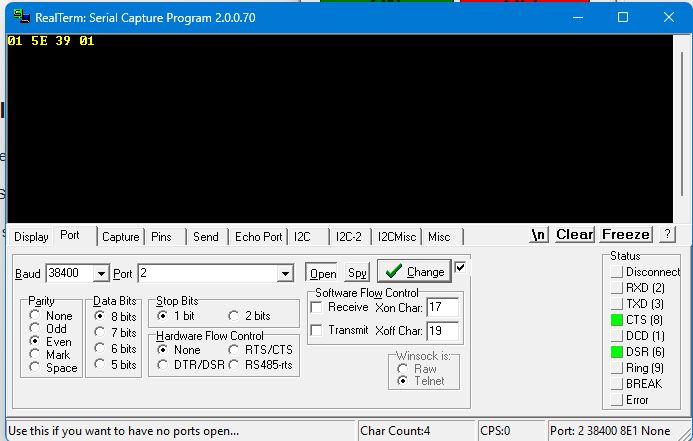
0x01 ⇒ Node id of the motor, 0x5E 0x39 ⇒ firmware version, 0x01 ⇒ NL080Q motor type.
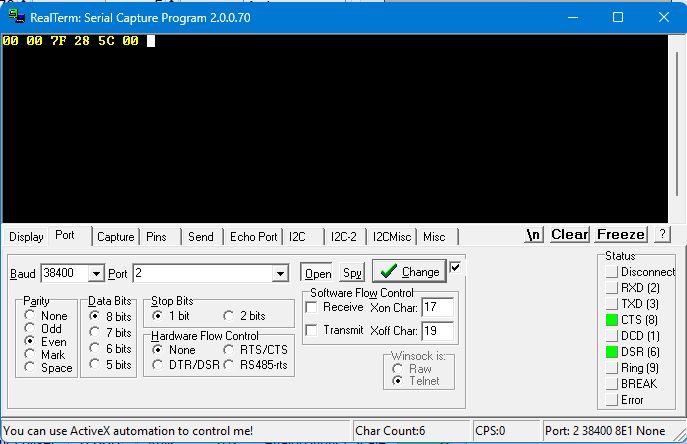
Incorrect reply of the motor when the MODBUS RTU fieldbus lines are swapped.
The first and the last byte are 0x00, and the 4 bytes between are wrong.