

meta data for this page
NiLAB ST to IL Compiler - Simulator
NiLAB uPLC — Structured Text to IL Converter
Online tool for programming NiLAB integrated drive motors (NLi family) using IEC 61131-3 Structured Text syntax. The tool compiles ST source code into Instruction List (IL) format compatible with the NiLAB µPLC firmware (>= 5E41).
Access the tool: ni-lab.online → Tools → ST Converter
1. Overview
The NiLAB µPLC is an embedded soft-PLC running inside every NLi integrated drive motor. It executes a program written in Instruction List (IL) format — a low-level, line-by-line language similar to assembly. Writing IL directly is error-prone and hard to read. The ST-to-IL Converter lets you write programs in Structured Text (ST), a high-level IEC 61131-3 language similar to Pascal, and compiles them automatically to IL.
| Parameter | Value |
| Firmware required | >= 5E41 |
| Max instructions | 64 |
| Scan cycle | 6msec (fixed) |
| Stack depth | 1 (no nested AND/OR in one IF) |
| Timers | 2 hardware timers (R8028, R8029) |
Key facts about the NiLAB µPLC:
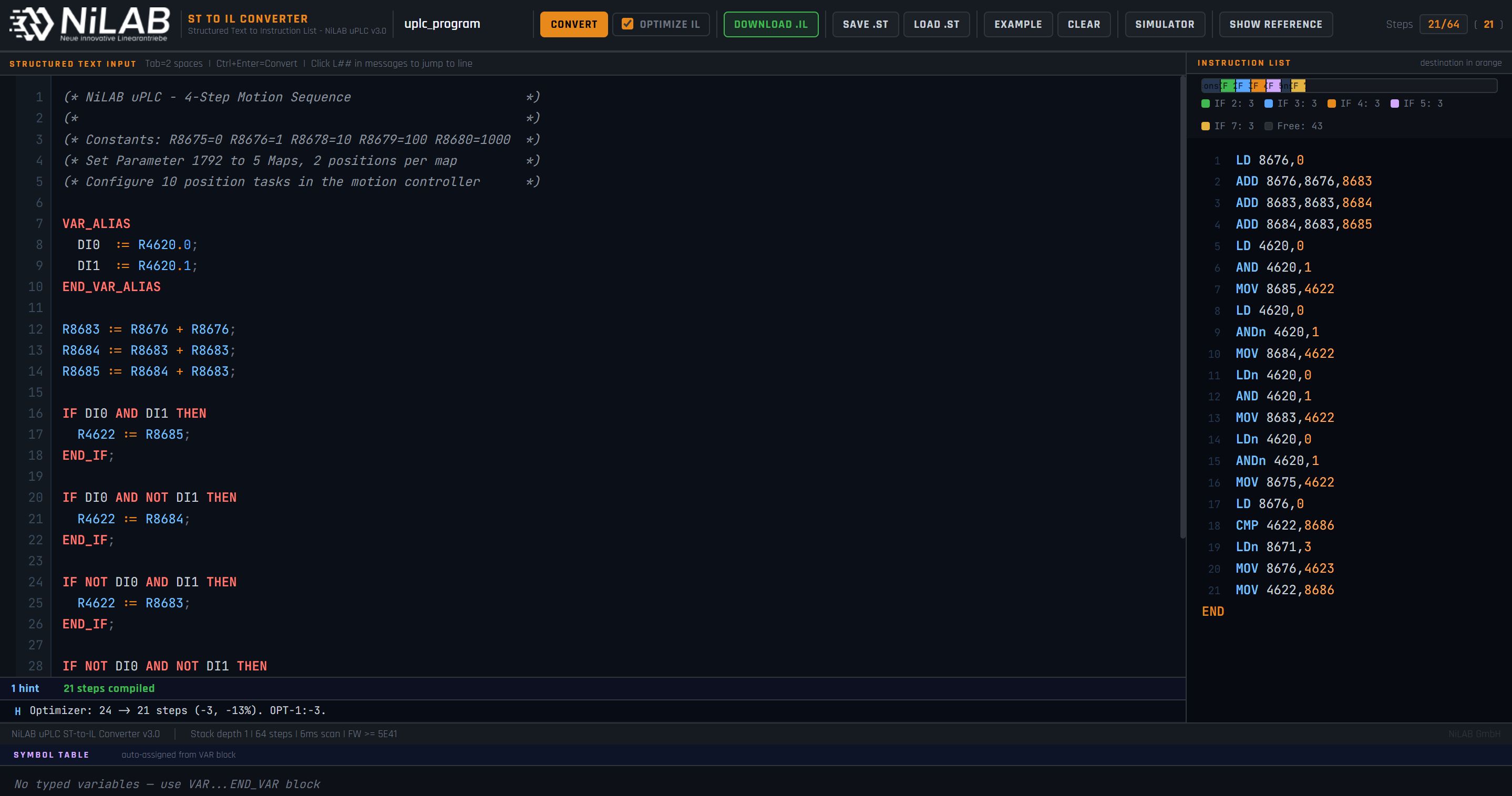
Figure 1: Main interface. Left column: ST editor. Right column: generated IL output. Bottom panels: Symbol Table and IL Simulator (when active).
2. Interface Layout
The tool is divided into three main areas:
① Toolbar — Project name field, Convert button, Download IL, Save/Load ST file, Optimize checkbox, Simulator toggle, Show/Hide Reference panel.
② ST Editor (left column, ~65% width) — Write your Structured Text program here. Features:
* Syntax highlighting (keywords in red, registers in blue, type names in purple, comments in grey)
* Line numbers with error markers in the gutter (red ! = error, yellow W = warning)
* Tab key inserts 2 spaces
* Ctrl+Enter triggers conversion
③ IL Output (right column, ~35% width) — The compiled Instruction List appears here after pressing Convert. Step numbers are shown in grey on the left; the destination register of math instructions is highlighted in orange.
④ Message Panel — Located below the ST editor. Shows compilation errors (red), warnings (yellow) and optimizer hints (blue). Click any L## location tag to jump to that line in the editor.
⑤ Symbol Table — Appears at the bottom of the page when a VAR block is present. Shows all declared variables with their auto-assigned register addresses.
⑥ IL Simulator — Appears below the Symbol Table when the Simulator button is activated. Allows step-by-step or continuous execution of the compiled IL.
⑦ Reference Panel — Hidden by default. Press Show Reference in the toolbar to open a syntax quick-reference sidebar.
3. ST Language Reference
3.1 VAR_ALIAS Block
Use VAR_ALIAS to give readable names to hardware registers and bit addresses. These are simple text substitutions — no register is automatically assigned.
\
VAR_ALIAS\
DI0  := R4620.0;    (* Digital Input 0, bit 0 of R4620 *)\
DI1  := R4620.1;    (* Digital Input 1, bit 1 of R4620 *)\
ACTV := R8684.1;    (* Sequence active flag             *)\
TIMER1 := R8028;    (* Timer 1 register                 *)\
END_VAR_ALIAS\
* Bit alias syntax: Name := R####.N; (register address . bit index 0-15) * Register alias syntax: Name := R####; * Must appear before any program \statements * Names are case-sensitive
3.2 VAR Block (typed variables)
Use VAR to declare typed variables. The compiler automatically assigns the next free register from the allocation pool — you do not need to know register addresses.
\VAR
counter : INT  := 0;   (* auto-assigned to R8683         *)
enable  : BOOL;        (* auto-assigned to R8681.0       *)
done    : BOOL := TRUE;(* auto-assigned to R8681.1, init *)
T1      : TON;         (* auto-assigned to Timer1 R8028  *)
edge1   : R_TRIG;      (* auto-assigned 2 BOOL slots     *)
\END_VAR
Supported types:
| Type | IL register pool | Max | Initial Value |
| BOOL | R8681 bits 0-15, then R8682 bits 0-15 | 32 | 0/1/TRUE/FALSE |
| INT | R8683, R8684, R8685, R8686, R8687, R868 | 6 | 0,1,10,100,1000 |
| DWORD | same pool as INT | 6 | same |
| TON | R8028 (Timer1), R8029 (Timer2) | 2 | - |
| CTD | R8028 (Timer1), R8029 (Timer2) | 2 | - |
| CTU | one INT slot for counter value | 16 | - |
| R_TRIG | 2 BOOL slots (memory + Q output) | 16 | - |
| F_TRIG | 2 BOOL slots (memory + Q output) | 16 | - |
Note: Constants R8675–R8680 are read-only and cannot be used as write destinations. The compiler enforces this with an error.
3.3 Register Constants
The following constant registers are always available without declaration:
| Register | Value | Usage example |
| R8675 | 0 | Reset a register to zero |
| R8676 | 1 | Increment, boolean TRUE |
| R8678 | 10 | Multiply or compare |
| R8679 | 100 | Timer reload value (600msec) |
| R8680 | 1000 | Large constant |
Integer literals 0, 1, 10, 100 and 1000 are automatically mapped to these registers in the compiler. Any other literal value will produce a compilation error — pre-load the value into a user register first.
3.4 IF / ELSE / END_IF
\
IF condition THEN\
statement(s);\
ELSE               (* optional *)\
statement(s);\
END_IF;\
Condition operators:
| Operator | IL Instruction | Notes |
| AND | AND / ANDn | Serie contact |
| OR | OR / ORn | Parallel contact |
| NOT | LDn / ANDn / ORn | Inverts the following term |
Mixing AND and OR is supported with strictly left-to-right evaluation (no operator precedence): * A AND B OR C → IL: LD A, AND B, OR C → result: (A AND B) OR C * A OR B AND C → IL: LD A, OR B, AND C → result: (A OR B) AND C * A warning is shown when AND and OR are mixed in the same condition.
Stack depth = 1 limitation: Each IF condition uses the single-level stack. You cannot use(A AND B) OR (C AND D)in one IF — split into two IF blocks or use an intermediate BOOL flag.
3.5 Bit Statements
SET(R4621.0);          (* latch bit ON  *)\
RESET(R4621.0);        (* latch bit OFF *)\
R4621.0 := 1;          (* equivalent to SET  *)\
R4621.0 := 0;          (* equivalent to RESET *)\
* Bit index must be 0 to 15 * Cannot assign a register value directly to a bit — use SET/RESET inside IF instead
3.6 Register Math
(* Four arithmetic operations *)
Rc := Ra + Rb;         (* IL: ADD Ra,Rb,Rc *)
Rc := Ra - Rb;         (* IL: SUB Ra,Rb,Rc *)
Rc := Ra * Rb;         (* IL: MUL Ra,Rb,Rc *)
Rc := Ra / Rb;         (* IL: DIV Ra,Rb,Rc — integer division *)

(* Copy *)
Rb := Ra;              (* IL: MOV Ra,Rb *)

(* Compare — sets flags in R8671 *)
CMP(Ra, Rb);
CMP result flags in R8671:
| Bit | Flag | Meaning |
| .0 | T1 | Timer1 (R8028) expired |
| .1 | T2 | Timer2 (R8029) expired |
| .2 | LT | Pa < Pb |
| .3 | EQ | Pa = Pb |
| .4 | GT | Pa > Pb |
* Math statements at the top level (outside any IF) always execute every scan * Math statements inside IF execute only when the condition is true
3.7 Function Blocks
Function blocks are called by name with named port assignments. They are expanded inline to IL instructions.
R_TRIG — Rising Edge Detector
\
VAR\
edge1 : R_TRIG;\
END_VAR\
VAR_ALIAS\
DI1 := R4620.1;\
END_VAR_ALIAS

edge1(CLK := DI1);

(* edge1.Q is TRUE for exactly one scan on the rising edge of DI1 *)\
IF edge1.Q AND NOT ACTV THEN\
SET(ACTV);\
END_IF;\
Generated IL (4 instructions): LD / ANDn / OUT / LD / OUT
F_TRIG — Falling Edge Detector
Same as R_TRIG but triggers on the falling edge. Port: CLK.
TON — Timer On-Delay
\VAR
T1 : TON;
END_VAR

T1(IN := ACTV, PT := 100);
(* PT=100 scans × 6ms = 600ms delay *)
(* T1 expired when R8671.0 = 1      *)

IF R8671.0 AND ACTV \THEN
(* timer expired action *)
R8028 := R8679;    (* reload timer *)
END_IF;
* PT value maps to a constant register: 1→R8676, 10→R8678, 100→R8679, 1000→R8680 * Q output is R8671.0 (Timer1) or R8671.1 (Timer2)
CTU — Up Counter
\VAR
C1 : CTU;
END_VAR

C1(CU := pulse_bit, PV := 5);
(* C1.Q = TRUE when count>= 5 *)
* Counter value stored in an auto-assigned INT register * Reset the counter: R8683 := R8675; (set to 0)
4. IL Optimizer
Enable the Optimize IL checkbox before pressing Convert to activate the optimizer. It runs up to 12 iterative passes and applies four transformations:
OPT-1 — Condition Hoisting (largest saving)
Each statement inside an IF block normally repeats the full condition. The optimizer detects consecutive repeated conditions and emits them only once, keeping the stack active across multiple actions.
Before:   LD 8671,2  AND 8671,0  ADD 4622,8683,4622   (3+1 = 4 instructions)
        LD 8671,2  AND 8671,0  MOV 8679,8028         (3+1 = 4 instructions)

After:    LD 8671,2  AND 8671,0  ADD 4622,8683,4622    (3+1+1 = 5 instructions)
                               MOV 8679,\8028
For an IF with N statements and a condition of length C, saving is (N-1) × C instructions.
OPT-2 — IF/ELSE SET/RES → OUT
IF A THEN SET(Q); ELSE RESET(Q); END_IF; is semantically identical to OUT Q — the bit receives exactly the stack value.
Before:   LD 4620,1   SET 8684,0      (2 instructions)
        LDn 4620,1  RES 8684,0      (2 instructions)

After:    LD 4620,1   OUT 8684,0      (2 instructions total)
OPT-3 — Dead MOV Elimination
MOV Pa, Pa (copy register to itself) is removed silently.
OPT-4 — Double NOT Elimination
LDn + OUTn → LD + OUT (double negation cancels out).
Typical savings: 30–45% on programs with multiple IF blocks. The message panel shows a breakdown: e.g. Optimizer: 38 → 22 steps (-42%). OPT-1:-14, OPT-2:-2. Passes: 2.
5. Symbol Table
The Symbol Table appears automatically at the bottom of the page when the program contains a VAR block. It shows:
* Name — the variable name as declared * Type — BOOL, INT, TON, R_TRIG, etc. (color-coded) * Register — the auto-assigned hardware register address
The count badge (e.g. 3 vars) shows how many typed variables were declared.
Use the Symbol Table to know exactly which register corresponds to each variable when monitoring the motor with MODBUS or NiLAB Starter.
6. IL Simulator
The IL Simulator executes the compiled IL program cycle-by-cycle directly in the browser, allowing functional verification without connecting to hardware.
Activating the Simulator
- Press Convert first to compile the ST program - Press the Simulator button in the toolbar — the panel appears at the bottom - The IL is loaded automatically from the output panel - Press Reset to initialize all registers to their default values
If you modify the ST program and press Convert again while the Simulator is active, the IL is reloaded and the simulation resets automatically.
Simulator Panels
Inputs R4620 — Three toggle buttons (IN0, IN1, IN2) representing bits 0-2 of the digital input register R4620. Click to toggle the bit. Green highlight = bit is 1.
Outputs R4621 — Four LEDs showing bits 0-2 of R4621 (digital outputs) and bit 0 of R4096 (drive enable). Orange = active.
R4622 — Displays the current value of the user output register R4622 (motion table index, position command, etc.).
Flags R8671 — Indicator pills for each flag bit. Green = active: * T1, T2 — Timer expired * LT, EQ, GT — Result of last CMP instruction
Controls: * Reset — Reloads IL from the output panel and initializes all registers * Step — Executes one complete scan cycle (or press Space when paused) * Run / Pause — Continuous execution at the selected speed * Slow / Med / Fast / 6ms — Scan interval: 1000ms / 300ms / 80ms / 6ms (real hardware speed)
Registers — A list of all registers referenced in the compiled IL, shown as editable fields. Values update every scan cycle. You can also type a new value to override a register (useful to inject a position value or simulate a MODBUS write).
Timer Simulation
Both hardware timers (R8028, R8029) are decremented by 1 at the start of each scan cycle. The T1/T2 flags in R8671 are set when the timer reaches zero. To simulate a 600ms timer:
- Set R8028 = 100 in the register panel (100 scans × 6ms = 600ms) - Run the simulation — after 100 scan cycles, T1 flag turns green - The program must reload the timer (R8028 := R8679) to repeat the cycle
7. Save, Load and Download
| Button | Action |
| CONVERT | Compile the ST program. Shortcut: Ctrl+Enter |
| DOWNLOAD .IL | Save the compiled IL as a .il text file. Blocked if there are errors |
| SAVE .ST | Save the current ST source as a .st file |
| LOAD .ST | Open a previously saved .st file into the editor. Triggers automatic conversion |
| OPTIMIZE IL | checkbox — enable before Convert to activate the 4-pass IL optimizer |
| SIMULATOR | Toggle the IL Simulator panel |
| SHOW REFERENCE | Toggle the syntax reference sidebar |
| PROJECT NAME FIELD | Sets the filename used by Download/Save buttons |
8. Loading the IL into the Motor
After downloading the .il file:
- Open NiLAB Starter (or your MODBUS tool) - Connect to the NLi motor via USB or RS485 - Navigate to the µPLC section - Upload the .il file using the PLC Program Upload function - Verify the step count shown in Starter matches the converter output - Enable the µPLC scan (parameter 1800 or via the enable bit in R4096)
The maximum program size is 64 instructions (including the mandatoryEND). The step counter in the toolbar shows current usage and turns yellow above 48 steps and red above 64.
9. Limitations and Known Constraints
| Constraint | Details |
| Max instructions | 64 steps (including END) |
| Stack depth | 1 — no nested AND/OR within one IF condition |
| No FOR / WHILE loops | Use timer-based sequences or unrolled logic instead |
| No nested IF | Use flag bits (BOOL variables) for complex state |
| No arithmetic in conditions | Evaluate with CMP first, then test R8671 flag bits |
| Constant literals | Only 0, 1, 10, 100, 1000 map to constant registers |
| MAX BOOL variables | 32 (bits 0-15 of R8681 and R8682) |
| MAX INT variables | 6 (R8683 to R8688) |
| MAX timers (TON/CTD) | 2 (R8028 and R8029) |
| Bit index range | 0 to 15 only |
| Read-only registers | R8675–R8680 cannot be write destinations |
10. Complete Example — 4-Step Motion with 2 Digital Inputs
This program selects one of four motion table entries based on the state of two digital inputs. It is typically used with the NiLAB motion controller configured for 5 maps with 2 positions per map (parameter 1792 = 5).
\
(* NiLAB uPLC - 4-Step Motion Sequence with 2 Digital Inputs  *)\
(*                                                              *)\
(* Parameter 1792 = 5 Maps, 2 positions per map               *)\
(* Motion controller: 10 position tasks configured             *)

VAR_ALIAS\
DI0  := R4620.0;    (* Digital Input 0 *)\
DI1  := R4620.1;    (* Digital Input 1 *)\
END_VAR_ALIAS

(* Pre-calculate table index constants *)\
R8683 := R8676 + R8676;   (* R8683 = 2 *)\
R8684 := R8683 + R8683;   (* R8684 = 4 *)\
R8685 := R8684 + R8683;   (* R8685 = 6 *)

(* Select table index based on DI0 and DI1 combination *)\
IF DI0 AND DI1 THEN         (* DI0=1, DI1=1 → index 6 *)\
R4622 := R8685;\
END_IF;

IF DI0 AND NOT DI1 THEN     (* DI0=1, DI1=0 → index 4 *)\
R4622 := R8684;\
END_IF;

IF NOT DI0 AND DI1 THEN     (* DI0=0, DI1=1 → index 2 *)\
R4622 := R8683;\
END_IF;

IF NOT DI0 AND NOT DI1 THEN (* DI0=0, DI1=0 → index 0 *)\
R4622 := R8675;\
END_IF;

(* Write table index only when it changes *)\
CMP(R4622, R8686);\
IF NOT R8671.3 THEN         (* EQ flag = 0 means value changed *)\
R4623 := R8676;           (* signal: new table index active  *)\
R8686 := R4622;           (* save current index as reference *)\
END_IF;\
Truth table:
| DI0 | DI1 | R4622 (table index) - R4623 must set to 1 | Motion position |
| 0 | 0 | 0 | Position task 0 and 1 |
| 0 | 1 | 2 | Position task 2 and 3 |
| 1 | 0 | 4 | Position task 4 and 5 |
| 1 | 1 | 6 | Position task 6 and 7 |
How to test with the Simulator: - Press Convert (with Optimize IL enabled: 23 instructions → ~16) - Press Simulator → Reset - Toggle IN0 and IN1 buttons — observe R4622 changing in the register panel - The EQ flag (R8671.3) should be 0 when the value changes and 1 when it stays the same - R4623 changes to 1 only on the scan when the table index changes